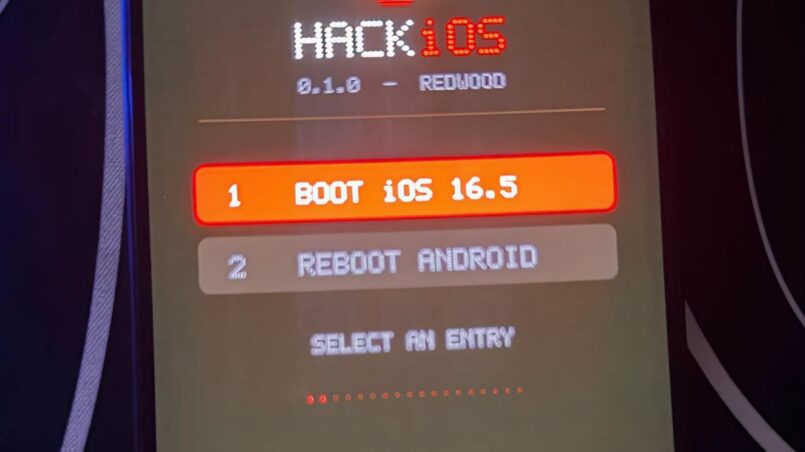
Getting iOS on Android phone hardware may sound like an impossible experiment, but HackiOS makes it a reality. This open-source research project boots Apple’s XNU kernel on a POCO X5 Pro 5G and loads the original iOS 16.5 user space. Core interface components, including SpringBoard, Settings, and Safari, reportedly run on Snapdragon hardware.
HackiOS is not an ordinary iOS theme, launcher, or visual imitation. It is an experimental operating-system project that attempts to run real Apple software on non-Apple hardware. The achievement is significant for developers and operating-system researchers, although its limitations remain substantial.
The project raises a common question: Can you run iOS 16.5 on an Android phone? HackiOS demonstrates that it is possible in a research environment, but it does not turn an Android phone into a fully functional iPhone. Cellular connectivity, Bluetooth, Apple ID, and several other features remain unavailable.
What HackiOS Actually Is
HackiOS is an independent open-source research project developed by OOSEX GANG. According to the supplied article, its first source release, version 0.1.0, appeared on October 22, 2026. The project targets the POCO X5 Pro 5G and QEMU virtual machines running on a PC.
The operating-system foundation is Apple’s open-source XNU kernel, which forms the core of macOS and iOS. XNU combines Mach, components from FreeBSD, and the IOKit driver framework. HackiOS uses this kernel foundation alongside an iOS 16.5 user space extracted from Apple’s IPSW firmware.
Apple’s firmware files are not included in the project repository. This distinction matters because the project provides the research code, while the required iOS system files come from Apple’s firmware.
The result is different from an iOS simulator on Android or a launcher that copies the iPhone interface. HackiOS aims to execute real iOS code on non-Apple hardware. Its kernel and system components need to interact with the Qualcomm platform, which creates major engineering challenges.
The project attracted attention on Hacker News shortly after its release. For readers interested in how operating systems and software environments evolve, our Googlebook review and Android laptop coverage explores another part of the broader Android ecosystem.
iOS on Android Phone: How the Boot Works
HackiOS uses a RAM-based boot process on the POCO X5 Pro 5G. A custom loader and system image load directly into memory instead of permanently replacing Android on the phone’s storage.
This design makes the experiment less invasive than a complete firmware flash. After a reboot, the device returns to its normal Android environment. The supplied article also reports short experimental sessions, approximately 15 minutes on the phone and 20 minutes in QEMU.
However, the process still requires an unlocked bootloader. Unlocking a bootloader can introduce security risks and may affect device data or warranty conditions, depending on the manufacturer and region.
Custom Drivers and UEFI
Apple’s operating system expects Apple-designed hardware. HackiOS therefore needs replacement drivers and compatibility components to work with Qualcomm hardware.
A custom UEFI environment starts the kernel. This is an important part of the boot process because the operating system needs a suitable environment before it can initialize the hardware and load its user space.
The experiment is not equivalent to installing an ordinary Android application. It involves kernel-level work, hardware compatibility, boot configuration, and system files.
iOS on Android Phone: HackiOS Status at a Glance
The following table summarizes the status reported by the project and the supplied coverage. These results have not been independently reproduced for this article.
| Area | Reported Status |
|---|---|
| Supported phone | POCO X5 Pro 5G with Snapdragon hardware |
| Other targets | QEMU on a Linux PC |
| iOS version | iOS 16.5 user space |
| Boot method | RAM-based; reboot returns to Android |
| Home screen, Settings, Safari | Reported working |
| Wi-Fi and audio | Reported working |
| Camera | Still photography reported working |
| Cellular | Not working |
| Bluetooth | Not working |
| Charging while running | Not working; phone only discharges |
| Apple ID and App Store | Not working |
| Metal graphics | Unfinished |
| License and price | Open source and free |
The table shows why HackiOS is best understood as an experimental research platform. Some core interface and hardware functions reportedly operate, but several features required for normal smartphone use remain unavailable.
What Works With iOS on Android Phone Today
HackiOS reportedly provides more than a static interface. The home screen loads, Settings opens, Safari runs, and Wi-Fi connects. Audio playback is also reported to work.
The camera is one of the more notable features. Hacker News commenters highlighted that camera support can be difficult in other Android ports, making reported still photography an interesting development. However, the source does not establish that every camera function or recording mode works.
Touchscreen input is mentioned in the project description, although the supplied reports provide less detail about its behavior and reliability.
Another useful feature is QEMU support. The same build reportedly runs in a virtual machine on a Linux computer. This gives developers a way to explore the iOS 16.5 Android experiment without immediately modifying a physical phone.
QEMU can be particularly useful for early testing, debugging, and research. It does not remove all compatibility limitations, but it provides an alternative to testing directly on hardware.
For more Android and mobile technology coverage, readers can explore CircuitVerdict’s phone category.
What Does Not Work
The most significant limitation of HackiOS is cellular connectivity. Without a functioning cellular connection, the device cannot make conventional calls or send SMS messages through the mobile network.
Bluetooth is also unavailable. The supplied article says that Settings displays Bluetooth as “Unavailable.”
Apple ID sign-in and App Store access do not work. The project website reportedly attributes these problems to the absence of a Secure Enclave, while the FairPlay daemon exits. These missing components prevent important Apple services from operating as they would on a genuine iPhone.
Charging is another limitation. Under the custom kernel, charging reportedly does not work, so the battery continues to discharge while the system is running.
There are also concerns about services that rely on device verification. Hacker News commenters suggest that services such as iMessage may fail because they depend on device attestation. Beeper Mini is mentioned as a precedent in the discussion, but this remains a reported expectation rather than an independently verified HackiOS test.
These limitations make HackiOS unsuitable as a replacement for a regular Android phone or iPhone.
How to Use iOS on Android: A Cautious Guide
Many users search for how to use iOS on Android, but HackiOS should be approached as a research project rather than a conventional installation. The supplied article describes a specific target device and a development-oriented process.
What You Need
The reported requirements include:
- A POCO X5 Pro 5G with an unlocked bootloader, or a Linux PC running QEMU
- HackiOS kernel and userland repositories from GitHub
- iOS 16.5 system files extracted from Apple’s IPSW firmware
- The porting guide and launch script from the kernel repository
- A spare phone that is not used as your daily device
For those exploring how to run iOS on an Android device, starting with QEMU is the more cautious option described in the supplied article. A virtual machine avoids the direct hardware risks associated with testing on a phone.
Before attempting a physical-device boot, read the project’s porting guide and understand the requirements. Avoid unofficial one-click APKs or flash packages claiming to install HackiOS. The supplied source identifies the project’s GitHub repositories as the official source.
You should also review applicable local laws. Apple’s firmware is copyrighted, and HackiOS does not bundle Apple’s system files in its repository. Users should obtain and handle firmware files responsibly.
The source repositories include the HackiOS XNU kernel, the HackiOS userland, and the project’s porting guide. These resources are more appropriate starting points than unofficial download packages.
Why iOS on POCO Matters
The iOS on POCO experiment is significant beyond one Android phone. The supplied article describes HackiOS as a notable demonstration of modern iOS booting on non-Apple hardware, moving beyond earlier approaches that relied on emulation.
For developers, the project offers an opportunity to study XNU, IOKit, kernel boot processes, and hardware-driver design. The POCO X5 Pro provides a Snapdragon-based platform for examining how Apple’s software behaves when it is separated from its original hardware environment.
Security researchers may also find the project useful as an experimental environment. However, it should not be treated as a secure everyday operating system. Its experimental nature and missing hardware security features limit its suitability for sensitive tasks.
HackiOS is not about replacing an Android phone with an iPhone. Instead, it demonstrates how software and operating-system components can be studied outside the hardware environment for which they were originally designed.
The concept may encourage further research into compatibility layers and operating-system portability. However, the possibility of a commercial phone delivering a fully iOS-like experience remains speculative and is not demonstrated by this project.
For other technology experiments and software coverage, see our DaVinci Resolve AI MCP article and Call of Duty matchmaking coverage.
Strengths and Weaknesses
Strengths
- Uses the real XNU kernel and iOS 16.5 user space
- Open-source research project hosted on GitHub
- Supports QEMU, allowing testing without a physical phone
- RAM-based boot returns the phone to Android after reboot
- Wi-Fi, audio, Safari, and camera are reportedly working
- Provides a valuable learning platform for operating-system developers
Weaknesses
- Cellular connectivity and Bluetooth do not work
- Apple ID and App Store are unavailable
- Charging does not work while the custom kernel runs
- Only one phone model is listed as supported
- An unlocked bootloader is required
- Legal and security questions remain
- Independent testing is limited
These strengths and weaknesses show the difference between an impressive technical demonstration and a finished smartphone operating system. HackiOS is valuable because of what it proves, not because it currently offers a complete user experience.
The Risks and Open Questions
Legal concerns are among the biggest unanswered questions. The supplied Hacker News discussion includes concerns about possible takedown actions because Apple closely controls its software and firmware. The project’s decision not to bundle Apple’s firmware is relevant, but it does not resolve every legal question.
Security is another concern. Running experimental or unsigned kernel code can expose a device to risks that are not present in a normal supported operating system. The absence of Apple’s hardware security environment also means that sensitive data should not be stored on the experimental system.
The project’s reported functionality also needs more independent verification. Early demonstrations and screenshots show progress, but a visible interface does not necessarily prove that a feature works reliably under different conditions.
Moreread reportedly notes that a displayed control does not prove its underlying function is operational. This is a useful distinction when evaluating experimental operating-system projects.
The next meaningful milestone would be broader independent testing, more complete hardware support, and clearer documentation of which features work consistently.
Final Verdict: A Research Marvel, Not a Replacement
HackiOS is an impressive research achievement. Booting real iOS 16.5 on a POCO X5 Pro demonstrates substantial operating-system engineering, especially in the areas of kernel compatibility, custom drivers, and hardware initialization.
The project is exciting for developers, operating-system researchers, and technology enthusiasts who want to explore how iOS works outside Apple’s hardware ecosystem. QEMU support also provides a lower-risk way to investigate the experiment.
However, iOS on Android phone hardware is not a practical alternative to Android or an iPhone yet. Missing cellular connectivity, Bluetooth, charging, Apple ID, and App Store support prevent it from functioning as a normal daily-use phone.
HackiOS should be viewed as a research bench, not a finished ROM. Its value lies in technical exploration and what it may teach developers about operating systems. As the project evolves, additional independent testing will be needed to confirm its capabilities and reliability.
iOS on Android Phone FAQ
Can you run iOS 16.5 on an Android phone?
HackiOS reportedly boots iOS 16.5 on the POCO X5 Pro 5G in a research setting. It remains experimental and does not provide the full functionality of an iPhone.
Which phone does HackiOS support?
The supplied article identifies the POCO X5 Pro 5G as its supported phone. Other devices would require their own hardware-specific porting work, and an unlocked bootloader is required.
How to use iOS on Android with HackiOS?
The project provides kernel and userland source code on GitHub. The reported setup requires a supported POCO X5 Pro 5G or a Linux PC running QEMU, plus iOS 16.5 files extracted from Apple’s IPSW. Read the project’s porting guide before attempting anything.
Does HackiOS replace Android on the phone?
No. The reported phone method boots HackiOS from RAM. Rebooting the device returns it to Android.
What does not work in HackiOS?
Cellular, Bluetooth, charging while the custom kernel runs, Apple ID sign-in, and App Store access are reported as unavailable. Metal graphics support is unfinished.
Is HackiOS an Apple product?
No. HackiOS is an independent open-source research project developed by OOSEX GANG. Apple is not identified as a participant in the project.
HackiOS Links and Coverage
The following resources provide project documentation and coverage:
- HackiOS XNU kernel repository
- HackiOS v0.1.0 release
- HackiOS userland repository
- HackiOS porting guide
- HackiOS project website
- Hacker News discussion on running iOS 16.5 firmware on Android devices
- Moreread coverage of iOS 16.5 running on an Android phone
- King of Computer Media HackiOS coverage
- KuCoin News coverage of iOS on Android phones
Explore more technology stories at CircuitVerdict.