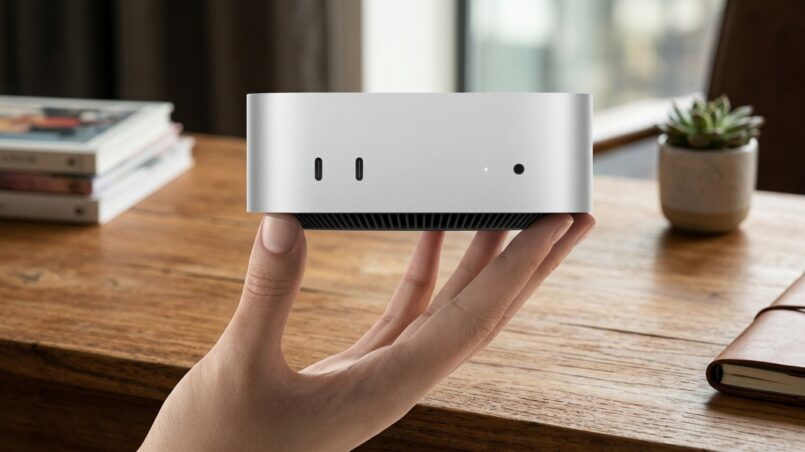
Two extra CPU cores, two additional GPU cores, a dual Neural Engine, and Apple’s first 2nm Mac processor. On paper, the M6 Mac Mini looks like the upgrade that M1 and M2 owners have been waiting for. It promises stronger performance, faster AI processing, improved graphics, and more modern connectivity. But there is one major problem: the starting price has climbed to $899.
Apple introduced two new desktop chips in August 2026. The M6 arrived inside the redesigned Mac Mini lineup, while the M5 Ultra powered the new Mac Studio. Both products target different buyers, budgets, and workloads. Combining them into one review would make little sense.
This article focuses on the M6 Mac Mini and whether its hardware improvements justify the higher price. The processor looks impressive, particularly for users who want local AI capabilities and stronger graphics. However, Apple’s pricing decisions make the upgrade harder to recommend.
The Mac Mini was once one of Apple’s most attractive entry points into the Mac ecosystem. At $899, it faces a different challenge: proving that its performance improvements are worth the extra money..
What’s Actually New Inside The M6
The biggest change is Apple’s M6 processor. It introduces a 2nm manufacturing process, making it the first Mac chip built using this smaller process technology. The move allows Apple to improve performance and power efficiency while introducing a more advanced CPU and GPU architecture.
The M6 features a 12-core CPU, compared with the 10-core configuration in the M4 Mac Mini. Its GPU also moves from 10 cores to 12. These additional cores should help with demanding workloads, including creative applications, graphics processing, and multitasking.
Apple claims the M6 Mac Mini delivers up to 40 percent faster CPU performance, twice the graphics performance, and up to four times the AI performance compared with the M4 model. These are substantial improvements on paper, although actual results depend on the application and workload.
The AI hardware is another major part of the upgrade. The M6 introduces Neural Accelerators inside its GPU architecture and includes two 16-core Neural Engines. This dual-Neural-Engine design gives the chip more dedicated hardware for machine-learning tasks.
That matters because Apple is increasingly positioning its desktop computers as platforms for on-device AI. Instead of sending every request to a cloud server, compatible applications can process certain AI workloads locally. This can reduce dependence on an internet connection and improve privacy for supported tasks.
A Bigger Focus On Local AI Performance
The M6’s AI improvements could be particularly useful for developers, creative professionals, and people experimenting with smaller language models.
Local image generation, AI-assisted editing, model inference, and other machine-learning workloads can benefit from dedicated acceleration hardware. The Mac Mini’s compact design also makes it suitable for an always-on desktop or home AI workstation.
However, there is an important distinction between having powerful AI hardware and being able to run every AI model comfortably. Unified memory capacity still matters. The M6 Mac Mini starts with 16GB of memory and supports configurations up to 32GB.
People planning to run larger local models should consider memory requirements before purchasing. A faster Neural Engine cannot compensate for insufficient system memory.
Apple’s official M6 Mac Mini announcement highlights the processor’s AI, graphics, and CPU improvements. It also explains how Apple intends to position the machine for productivity, creative projects, and always-on computing.
Faster Memory And Better Connectivity
Memory bandwidth also receives an upgrade. The M6 supports up to 170GB/s of unified memory bandwidth on higher-memory configurations. The 16GB configuration is listed at 153GB/s, so buyers should not assume every model delivers the maximum figure.
That distinction matters for demanding applications that move large amounts of data between the CPU, GPU, and unified memory.
Connectivity also gets a meaningful refresh. The M6 Mac Mini includes Wi-Fi 7 and Bluetooth 6, replacing the older wireless standards found in previous configurations. Its Ethernet connection moves to 2.5 Gigabit by default, with a 10 Gigabit option available.
These upgrades may not look exciting in marketing images, but they matter in practical desktop environments. Faster Ethernet can benefit users working with network storage, large files, or home servers. Wi-Fi 7 also provides a more modern wireless connection for compatible routers.
For people using the Mac Mini as a workstation, developer machine, or always-on home computer, these changes make the system more versatile.
M6 Mac Mini Specifications Compared With M4
| Specifications | M4 Mac Mini | M6 Mac Mini |
|---|---|---|
| CPU Cores | 10-core | 12-core |
| GPU Cores | 10-core | 12-core |
| Process Node | 3nm | 2nm |
| Neural Engine | Single 16-core | Dual 16-core |
| Memory Bandwidth | 120GB/s | 153GB/s or up to 170GB/s |
| Wi-Fi | Wi-Fi 6E | Wi-Fi 7 |
| Bluetooth | 5.3 | 6 |
| Ethernet | 1 Gigabit | 2.5 Gigabit |
| Starting Price | $599 | $899 |
Memory bandwidth on the M6 depends on the selected memory configuration. The 16GB version is listed at 153GB/s, while higher-memory configurations can reach 170GB/s.
For more details, Apple’s official Mac Mini technical specifications provide information about memory configurations, display support, connectivity, and the M6 architecture.
Who This Chip Is Actually For
The M6 makes the most sense for people still using an M1 or M2 Mac. For those owners, moving to a newer Apple silicon generation can deliver a substantial improvement in processing power, graphics, memory bandwidth, and AI capabilities.
The difference is more meaningful when the current machine struggles with demanding applications. Developers compiling large projects, creators editing high-resolution media, and professionals working with multiple applications may benefit from the newer architecture.
The additional CPU and GPU cores also make the M6 more attractive for workloads that use parallel processing. Video editing, software development, image processing, and compatible creative applications can take advantage of the extra resources.
Apple M6 Chip: Core Hardware Features
The M6 Mac Mini includes several important hardware components:
Apple M6 chip
- 12‑core CPU with 2 super cores, 4 performance cores, and 6 efficiency cores
- 12-core GPU
- Neural Accelerators
- Hardware-accelerated ray tracing
- Dual 16-core Neural Engine
- 153GB/s memory bandwidth
Media Engine - Hardware-accelerated H.264, HEVC, ProRes, and ProRes RAW
- Video decode engine
- Video encode engine
- ProRes encode and decode engine
- AV1 decode
The Media Engine is particularly useful for people who regularly work with video. Hardware acceleration for formats such as ProRes and HEVC can help compatible applications handle media tasks more efficiently.
The M6 also supports hardware-accelerated ray tracing, which improves its potential for supported games and 3D applications. Apple silicon has made Mac gaming more capable than it was during the Intel era, although software compatibility and game.
The Chip Is Not The Problem
The M6 is a meaningful processor upgrade. It brings a more advanced manufacturing process, additional CPU and GPU cores, stronger AI hardware, and improved connectivity.
For M1 and M2 owners, those changes can make a noticeable difference. Even M4 users may find the new AI capabilities and graphics improvements interesting if their workloads benefit from them.
But performance alone does not determine whether a computer is worth buying.
The problem is the price Apple has attached to the upgrade. A powerful chip becomes much harder to recommend when the entry-level machine costs hundreds of dollars more than the product it replaces.availability remain important considerations.
The Price Is The Real Story Here
For years, the Mac Mini represented one of Apple’s strongest value propositions. It offered access to macOS and Apple silicon without requiring buyers to spend MacBook Pro or Mac Studio money.
The M4 Mac Mini launched at $599 in November 2024. That price helped make it an attractive choice for students, developers, home-office users, and people building compact desktop setups.
The pricing situation changed in 2026.
According to the original pricing timeline, Apple increased the starting price from $599 to $799 in June 2026, citing rising component costs. The M6 launch in August then pushed the starting price to $899.
That creates a significant difference for buyers comparing the two generations.
| Date | Starting Price | Change |
| November 2024 (M4) | $599 | – |
| June 2026 (price hike) | $799 | +200$ |
| August 2026 (M6) | $899 | +100$ |
The total increase is $300 in less than two years. That is a 50 percent increase over the original $599 starting price.
The problem becomes more noticeable when buyers compare the base configurations. The original article highlights that the M4 model started with 16GB of memory and 256GB of storage. The M6 also starts with 16GB of unified memory and 256GB of SSD storage.
In other words, buyers are paying substantially more for a newer processor and improved connectivity without receiving a larger base memory or storage configuration.
Component costs, especially memory prices, may help explain some of the increase. However, an explanation does not make the product more affordable for customers.
Apple’s Mac Mini product page provides the latest configuration and pricing information. Buyers should check their local Apple Store or authorized retailer because prices and available configurations can vary by market.
The Mac Mini still has strong hardware, but its reputation as an affordable entry point into Apple’s desktop ecosystem is becoming harder to defend.
For additional context on the wider desktop market, our coverage of the NVIDIA RTX Spark and its pricing explores another example of powerful hardware facing a difficult value proposition.
Is It Still Worth Buying?
The M6 Mac Mini is a powerful desktop computer, but the $899 starting price changes the buying decision.
The important question is no longer whether the M6 is faster than the previous generation. It clearly brings meaningful architectural improvements. The real question is whether you need those improvements badly enough to justify the additional cost.
For someone still using an M1 or M2 Mac, the upgrade can make sense. The newer CPU, GPU, Neural Engine, memory bandwidth, and connectivity provide a more modern platform. If the current computer slows down professional work, waiting indefinitely for a price reduction may not be worthwhile.
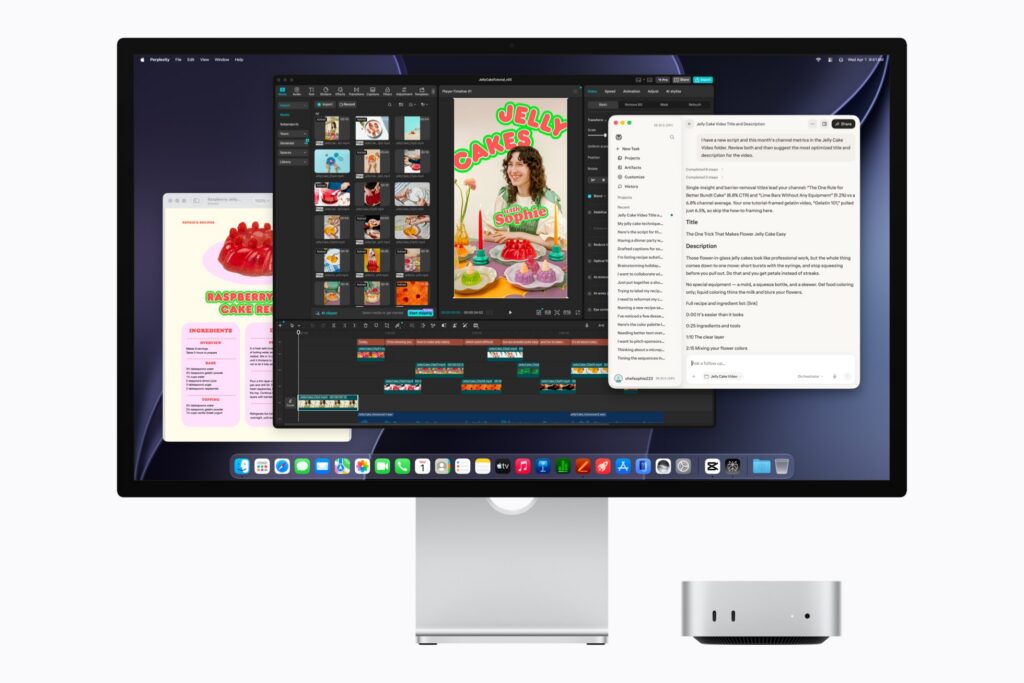
The situation is different for M4 owners. Their current machine may already handle everyday productivity, web development, office applications, and moderate creative work comfortably. Unless they need the M6’s additional AI or graphics performance, upgrading immediately may offer limited practical value.
When The M6 Mac Mini Makes Sense
The M6 is worth considering if you:
- Still use an older M1 or M2 Mac and need a meaningful performance upgrade.
- Work with demanding creative applications or large development projects.
- Want to experiment with local AI models and compatible applications.
- Need faster networking for a workstation or home-server setup.
- Plan to keep your desktop for several years and can justify the higher upfront cost.
When You Should Keep Your Current Mac
You may want to wait if your existing Mac already handles your daily workload. The same applies to buyers who mainly browse the web, stream content, write documents, and use basic productivity software.
Those tasks do not necessarily require the M6’s additional processing power.
You should also consider the cost of memory and storage upgrades. Since unified memory and internal SSD capacity are not user-upgradeable after purchase, choosing the right configuration at checkout is important.
A higher initial price can become even more expensive when you add the memory and storage capacity needed for demanding workflows.
Our AMD Ryzen 7 5800X3D review offers another perspective on how processor performance and platform value can influence a hardware purchase. The best choice depends on the applications you use, your budget, and how long you expect to keep the system.
Frequently Asked Questions
1. What is the M6 Mac Mini starting price?
The M6 Mac Mini starts at $899 in the United States. The higher starting price makes it considerably more expensive than the M4 Mac Mini’s original $599 launch price.
2. What are the main M6 Mac Mini specifications?
The M6 Mac Mini features a 12-core CPU, 12-core GPU, Dual 16-core Neural Engine, Neural Accelerators, and hardware-accelerated ray tracing. It also includes Wi-Fi 7, Bluetooth 6, and 2.5 Gigabit Ethernet.
3. Is the M6 Mac Mini Apple’s first 2nm Mac chip?
Yes. The M6 is Apple’s first Mac processor built using a 2nm manufacturing process. It combines a new CPU and GPU architecture with dedicated AI acceleration hardware.
4. How much memory does the M6 Mac Mini support?
The M6 Mac Mini starts with 16GB of unified memory and can be configured with up to 32GB. Memory bandwidth varies by configuration, reaching up to 170GB/s on higher-memory versions.
5. Is the M6 Mac Mini worth upgrading from an M1 or M2?
For many M1 and M2 owners, the M6 can offer a meaningful upgrade in CPU performance, graphics, AI processing, and connectivity. Whether it is worth buying depends on the workload and the $899 starting price.
6. M6 Mac Mini vs M5: What is the difference?
The M6 introduces a 12-core CPU, 12-core GPU, Neural Accelerators, and a Dual 16-core Neural Engine. It also uses a 2nm process and supports higher memory bandwidth. The exact performance difference depends on the workload and configuration being compared.
Conclusion: A Great Chip Trapped In A Bad Price Tag
The M6 Mac Mini is one of Apple’s more interesting desktop upgrades. Its 2nm processor, additional CPU and GPU cores, dual Neural Engine, and improved connectivity make it a capable machine for productivity, creative work, and local AI applications.
However, the $899 starting price makes the upgrade difficult to recommend to everyone. The M6 brings genuine improvements, but the base memory and storage remain familiar, while the overall cost has climbed considerably.
For M1 and M2 owners who need more performance, the M6 Mac Mini can be a worthwhile investment. For M4 users and people with lighter workloads, there is less reason to rush.
Apple has built a genuinely impressive chip. The problem is that the Mac Mini no longer feels like the affordable desktop it used to be.
The M6 Mac Mini has the performance to impress. Whether it has the value to match is a much harder question.
Image credit: Apple